Baumgart Software Guide Send a brief
  1. Home
  2. Demo projects
  3. Field inspection checklist app

Demo: Field inspection checklist app

Offline checklists, defect photos and a supervisor board for routine equipment inspections.

Demonstration project. This is an illustrative example written to show the artefacts of each phase. It is not a client project and not a case study, and it does not describe delivered results. The organisation, people and screens are invented.

Scenario

Imagine a facilities team that inspects fire extinguishers, emergency lighting and pump rooms across several buildings every month. Today the inspectors tick paper forms, and an administrator retypes them into a spreadsheet at the end of the week.

The team wants the round to be recorded once, on a phone, including in basements without mobile signal, and wants supervisors to see failed items without waiting for the weekly spreadsheet. Everything about this team is invented for the example.

phase 01 · requirements analysis

What the software must do

Stakeholders

RoleInterest
InspectorFinish the round quickly, also where there is no signal; no double entry.
SupervisorSee open defects per building and plan repairs.
AdministratorMaintain checklist templates and user access.
Building owner (indirect)Receive an inspection record when asked.

User stories and acceptance criteria

R-1

As an inspector, I need to complete a checklist without mobile signal, so that plant rooms in basements do not interrupt my round.

It is done when:

  • The checklist opens and saves with the phone in flight mode.
  • Saved answers are sent automatically once a connection returns.
  • The inspector sees how many answers are still waiting to sync.

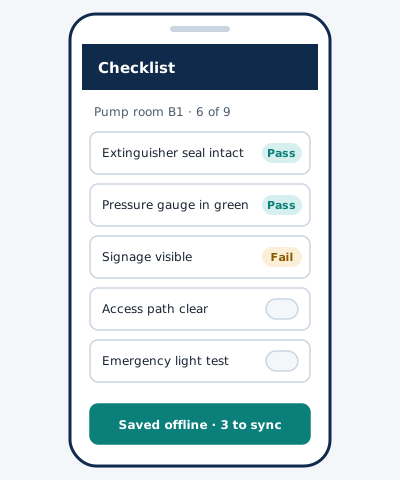
Traced to screen S-1 (Offline checklist) and module M-1 (Local store and sync queue).

R-2

As an inspector, I need to attach a photo to a failed item, so that the supervisor can judge the defect without a site visit.

It is done when:

  • A failed answer offers a camera button.
  • Photos are reduced in size on the phone before upload.
  • A failed item cannot be saved without a short note.

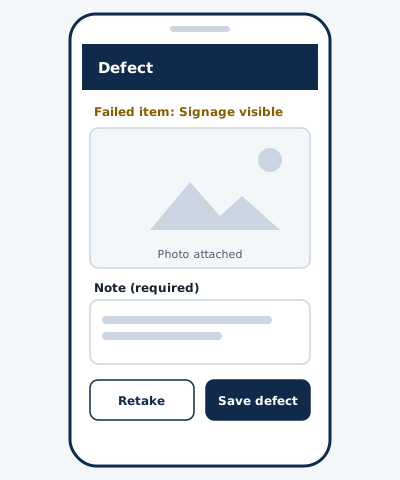
Traced to screen S-2 (Defect capture) and module M-2 (Media upload service).

R-3

As a supervisor, I need a list of open defects by building, so that I can schedule repairs.

It is done when:

  • The board can be filtered by building and by equipment type.
  • Each defect links to its checklist, photo and note.
  • The list can be exported as a CSV file.

Traced to screen S-3 (Defect board) and module M-3 (Reporting API and export).

Non-functional requirements

  • Works offline for a complete inspection round on a mid-range phone.
  • Only the data needed for the inspection is collected: inspector name, time, answers, photos of equipment.
  • Access is limited by role and by building.
  • The supervisor web view targets WCAG 2.2 level AA.

Out of scope

  • Scheduling of repair contractors.
  • Integration with an accounting system.
  • Native app store releases (see the design decision below).

phase 02 · software design

How it is structured

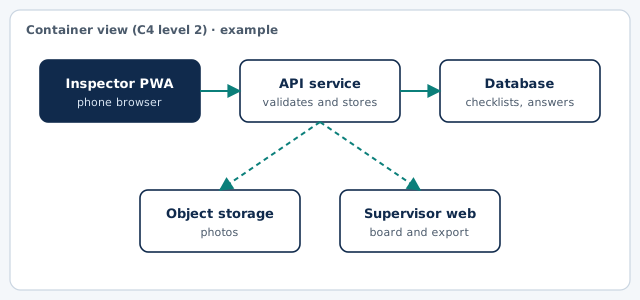
Container diagram of the example: Inspector PWA, API service, Database, Object storage, Supervisor web
Container view in the style of the C4 model. Drawn for this example.

Key screens (wireframes)

Example wireframe: Offline checklist
S-1 · Offline checklist (example)
Example wireframe: Defect capture
S-2 · Defect capture (example)

Main data entities

EntityMeaning
TemplateVersioned list of questions for one equipment type.
RoundOne inspector, one building, one date.
AnswerPass, fail or not applicable, with an optional note.
DefectCreated from a failed answer; open or closed.
PhotoStored file linked to one answer.

Architecture decision record

ADR 1: Deliver the inspector app as a progressive web app

context
Inspectors use a mix of phones. Store releases add a review step to every change, and the team has no mobile developers of its own. Offline storage and camera access are available in current mobile browsers.
decision
We will build the inspector app as a progressive web app with local storage and an explicit sync queue.
status
Accepted (example)
consequences
One codebase for all phones and no store review. Background sync is not equally reliable on every platform, so the app also shows a visible Sync now button and a count of unsent answers.

phase 03 · development & implementation

How it would be delivered

Increment plan

  1. Increment 1Checklist templates, offline completion and manual sync; administrator can create users.
  2. Increment 2Fail answers with notes and photos; defect records are created automatically.
  3. Increment 3Supervisor board with filters, CSV export and building-level permissions.

Test approach

  • Unit tests for the sync queue, including conflicts and retries.
  • Flight-mode test round on at least two phone models before each release.
  • Accessibility check of the supervisor board with keyboard only and a screen reader.

Handover checklist

  • Source code in a repository owned by the client.
  • Runbook: backups, restoring photos, rotating credentials.
  • Template guide for administrators.
  • List of known limitations of background sync.

What this example leaves out

There are no estimates, dates or costs here. They depend on your scope, your systems and your team, and they are discussed only after requirements analysis.