Baumgart Software Guide Send a brief
  1. Home
  2. Demo projects
  3. Stock and reorder dashboard

Demo: Stock and reorder dashboard

A low-stock list, purchase order drafts and a movement ledger for one small warehouse.

Demonstration project. This is an illustrative example written to show the artefacts of each phase. It is not a client project and not a case study, and it does not describe delivered results. The organisation, people and screens are invented.

Scenario

Picture a distributor of cleaning supplies with one warehouse and a few hundred product codes. Reorder decisions rely on the memory of the warehouse lead, and purchase orders are typed by hand from shelf counts.

The goal of this example is a dashboard that shows what is below its reorder point, turns a selection into a draft purchase order and keeps stock figures in step with goods received. The company and its products are fictional.

phase 01 · requirements analysis

What the software must do

Stakeholders

RoleInterest
Warehouse leadKnow what to reorder before shelves run empty.
BuyerPrepare purchase orders without retyping codes.
Operations managerTrust the stock figures and see who changed them.
Supplier (external)Receives purchase orders; no system access.

User stories and acceptance criteria

R-1

As a warehouse lead, I need to see every item below its reorder point, so that I can raise purchase orders in time.

It is done when:

  • Items below the reorder point are listed with current quantity and reorder point.
  • The list can be sorted by supplier.
  • Each item shows when its quantity last changed.

Traced to screen S-1 (Low-stock list) and module M-1 (Stock level calculator).

R-2

As a buyer, I need to draft a purchase order from selected low-stock items, so that I do not retype product codes.

It is done when:

  • Selected items are grouped into one draft per supplier.
  • Quantities can be edited before the draft is saved.
  • The draft can be downloaded as a PDF or CSV file.

Traced to screen S-2 (Purchase order draft) and module M-2 (Purchase order module).

R-3

As an operations manager, I need goods received to update stock at once, so that the low-stock list stays accurate.

It is done when:

  • Receiving against a purchase order adds a stock movement.
  • Partial deliveries leave the remaining quantity open.
  • Every movement records who entered it and when.

Traced to screen S-3 (Goods received) and module M-3 (Stock movement ledger).

Non-functional requirements

  • Stock figures are derived from recorded movements and can be recalculated at any time.
  • Role-based access: viewing, buying and receiving are separate permissions.
  • Daily backups with a tested restore procedure.
  • Pages remain usable on a tablet in the warehouse.

Out of scope

  • Supplier portal or electronic data interchange.
  • Multi-warehouse transfers.
  • Demand forecasting.

phase 02 · software design

How it is structured

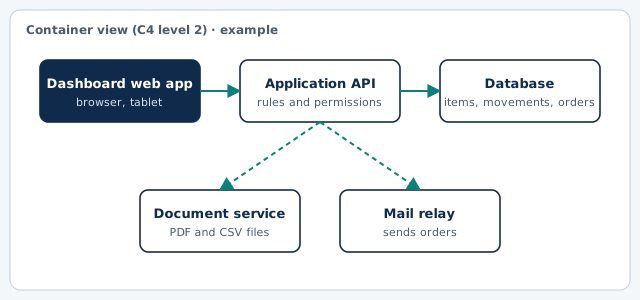
Container diagram of the example: Dashboard web app, Application API, Database, Document service, Mail relay
Container view in the style of the C4 model. Drawn for this example.

Key screens (wireframes)

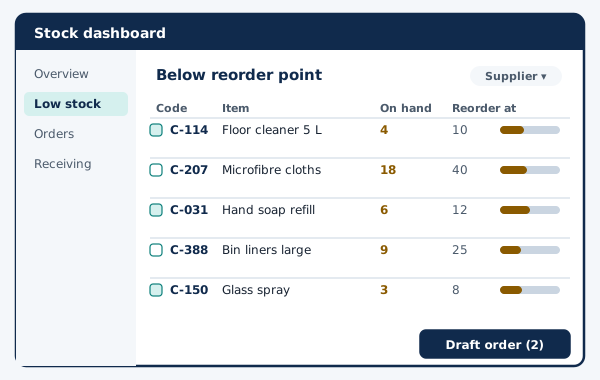
Example wireframe: Low-stock list
S-1 · Low-stock list (example)
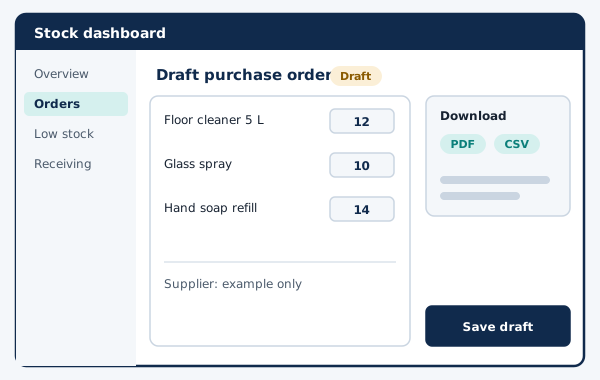
Example wireframe: Purchase order draft
S-2 · Purchase order draft (example)

Main data entities

EntityMeaning
ItemProduct code, unit, reorder point, preferred supplier.
MovementSigned quantity change with reason, user and time.
Purchase orderDraft, sent or closed; one supplier.
Order lineItem, ordered quantity, received quantity.
SupplierName and ordering e-mail.

Architecture decision record

ADR 1: Record stock as an append-only movement ledger

context
Today quantities are overwritten in a spreadsheet, and nobody can tell why a figure changed. Corrections after a stock count must stay traceable.
decision
We will store every change as a movement and calculate the current quantity from movements, with a cached total per item.
status
Accepted (example)
consequences
Every figure can be explained and audited. The cached total must be rebuilt if it ever disagrees with the ledger, so the system includes a recalculation job and a check that compares both.

phase 03 · development & implementation

How it would be delivered

Increment plan

  1. Increment 1Item import from the existing spreadsheet, movement ledger, low-stock list.
  2. Increment 2Purchase order drafts per supplier, PDF and CSV download.
  3. Increment 3Goods received with partial deliveries, permissions per role, audit view.

Test approach

  • Ledger tests: the cached total always equals the sum of movements.
  • Import rehearsal with a copy of the real spreadsheet before go-live.
  • Permission tests for each role.

Handover checklist

  • Repository and deployment scripts owned by the client.
  • Import mapping document.
  • Restore drill notes.
  • Admin guide for reorder points and suppliers.

What this example leaves out

There are no estimates, dates or costs here. They depend on your scope, your systems and your team, and they are discussed only after requirements analysis.