Baumgart Software Guide Send a brief
  1. Home
  2. Demo projects
  3. Internal service request portal

Demo: Internal service request portal

One intake form, routing rules, an agent queue and status e-mails for IT and facilities requests.

Demonstration project. This is an illustrative example written to show the artefacts of each phase. It is not a client project and not a case study, and it does not describe delivered results. The organisation, people and screens are invented.

Scenario

Suppose a mid-sized organisation receives IT and facilities requests by e-mail, chat and hallway conversations. Requests get lost, and requesters do not know whether anyone is working on them.

The example portal gives everyone one place to submit a request, routes it to the right team and keeps the requester informed. The organisation and its teams are made up for this demonstration.

phase 01 · requirements analysis

What the software must do

Stakeholders

RoleInterest
EmployeeSubmit a request once and see its status.
AgentWork through one queue in a sensible order.
Team leadAdjust routing rules and see the queue.
Data protection officerKnow what personal data the portal holds.

User stories and acceptance criteria

R-1

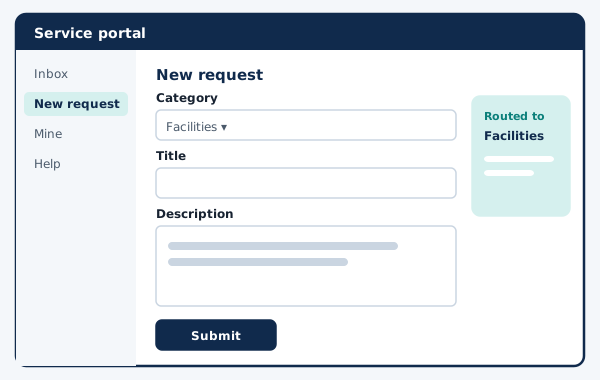
As an employee, I need to submit a request with a category, so that it reaches the right team.

It is done when:

  • The form asks for category, short title and description.
  • Routing rules assign the request to a team based on category.
  • The employee receives a reference number by e-mail.

Traced to screen S-1 (Request form) and module M-1 (Intake and routing rules).

R-2

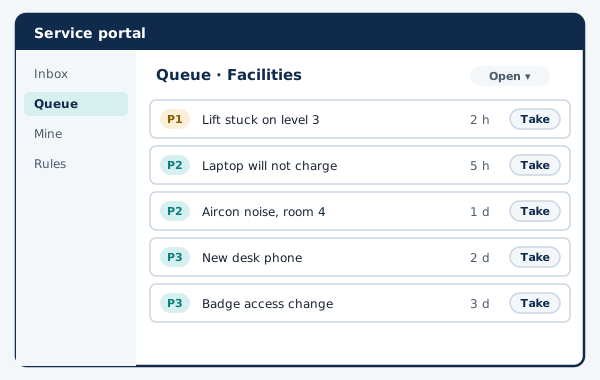
As an agent, I need a queue sorted by priority and age, so that urgent and old requests are not forgotten.

It is done when:

  • The queue shows priority, age and assignee.
  • An agent can take a request in one action.
  • Filters for team and status are kept between visits.

Traced to screen S-2 (Agent queue) and module M-2 (Queue service).

R-3

As a requester, I need an e-mail when the status of my request changes, so that I do not have to chase the team.

It is done when:

  • Status changes trigger one e-mail each.
  • E-mails contain a link to the request, not its full content.
  • Failed e-mails are retried and logged.

Traced to screen S-3 (Status timeline) and module M-3 (Notification worker).

Non-functional requirements

  • Personal data is limited to name, work e-mail and request content; retention follows the organisation's policy.
  • A slow mail server never delays saving a request.
  • Sign-in through the organisation's existing identity provider.
  • All pages meet WCAG 2.2 level AA targets.

Out of scope

  • Asset inventory.
  • Change management workflows.
  • Chat bot intake.

phase 02 · software design

How it is structured

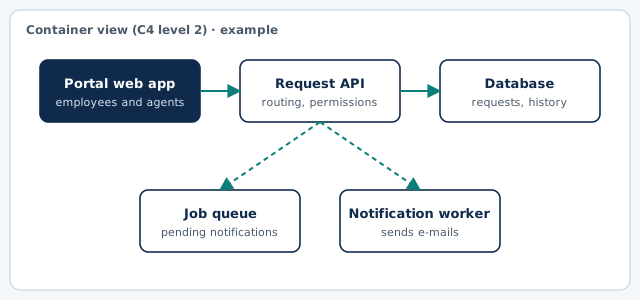
Container diagram of the example: Portal web app, Request API, Database, Job queue, Notification worker
Container view in the style of the C4 model. Drawn for this example.

Key screens (wireframes)

Example wireframe: Request form
S-1 · Request form (example)
Example wireframe: Agent queue
S-2 · Agent queue (example)

Main data entities

EntityMeaning
RequestTitle, description, category, priority, status.
CategoryName and routing team.
TeamAgents and queue settings.
Status changeOld status, new status, who, when.
NotificationRecipient, template, attempts, result.

Architecture decision record

ADR 1: Send notifications through a background job queue

context
Sending e-mail inside the web request makes saving slow and fails the save when the mail server is unavailable.
decision
We will write a notification job in the same database transaction as the status change and let a separate worker send it.
status
Accepted (example)
consequences
Saving stays fast and reliable. E-mails may arrive slightly later, and the worker needs monitoring and a retry limit.

phase 03 · development & implementation

How it would be delivered

Increment plan

  1. Increment 1Request form, categories, routing to teams, reference e-mail.
  2. Increment 2Agent queue with priority and age, taking and reassigning requests.
  3. Increment 3Status timeline, notification worker with retries, team lead settings.

Test approach

  • Routing rule tests for every category.
  • Worker tests with an unavailable mail server.
  • End-to-end test: submit, take, resolve, e-mail received.

Handover checklist

  • Repository and infrastructure scripts owned by the client.
  • Routing rule guide for team leads.
  • Worker monitoring and alert thresholds agreed with the client.
  • Record of processing for the data protection officer.

What this example leaves out

There are no estimates, dates or costs here. They depend on your scope, your systems and your team, and they are discussed only after requirements analysis.