Baumgart Software Guide Send a brief
  1. Home
  2. Demo projects
  3. Meeting room booking portal

Demo: Meeting room booking portal

Live availability, check-in to keep a booking, and maintenance blocks for a shared office floor.

Demonstration project. This is an illustrative example written to show the artefacts of each phase. It is not a client project and not a case study, and it does not describe delivered results. The organisation, people and screens are invented.

Scenario

Think of a shared office floor with several meeting rooms. Members message the front desk to ask what is free, rooms are often held by people who never turn up, and maintenance work is announced on a whiteboard.

This example describes a portal where members book rooms themselves, unused bookings are released, and the front desk can block rooms. The office, its members and its rooms are invented.

phase 01 · requirements analysis

What the software must do

Stakeholders

RoleInterest
MemberFind and book a free room in a few taps.
Front deskFewer booking messages; block rooms for maintenance.
Floor managerSet booking rules for the floor.
Visitor (indirect)Is met in the right room.

User stories and acceptance criteria

R-1

As a member, I need to see which rooms are free for a time slot, so that I can book without messaging the front desk.

It is done when:

  • The grid shows rooms against time slots for the chosen day.
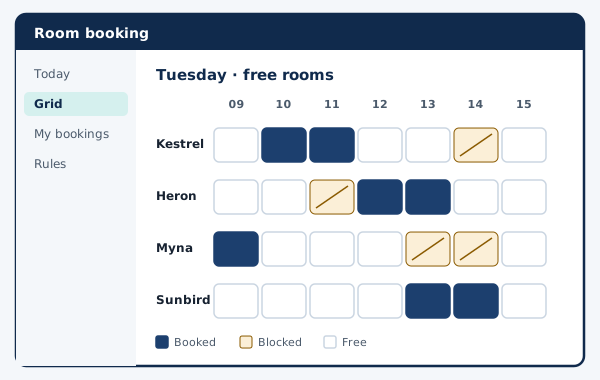
  • Booked and blocked slots are marked differently, not only by colour.
  • A free slot can be booked in one step from the grid.

Traced to screen S-1 (Availability grid) and module M-1 (Availability query).

R-2

As a member, I need to confirm I am using a booked room, so that unused bookings are released for others.

It is done when:

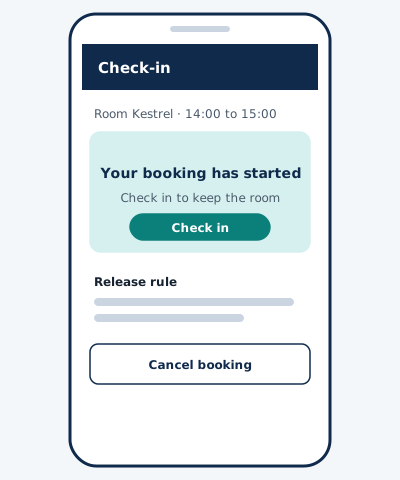
  • A check-in button appears on the booking when the slot starts.
  • Bookings without check-in are released after a grace period set by the floor manager.
  • The member is told when a booking was released.

Traced to screen S-2 (Check-in screen) and module M-2 (Booking rules engine).

R-3

As front desk staff, I need to block a room for maintenance, so that nobody can book it.

It is done when:

  • A block has a reason and an end time.
  • Existing bookings that clash are listed before the block is saved.
  • Blocks are recorded in an audit log.

Traced to screen S-3 (Room administration) and module M-3 (Admin and audit log).

Non-functional requirements

  • Two members can never hold the same room for overlapping times.
  • Times are stored with the time zone of the floor.
  • The booking grid works with keyboard only and announces slot states to screen readers.
  • Members sign in with the identity provider the floor already uses, if one exists.

Out of scope

  • Payments for room use.
  • Visitor registration.
  • Hardware panels at room doors.

phase 02 · software design

How it is structured

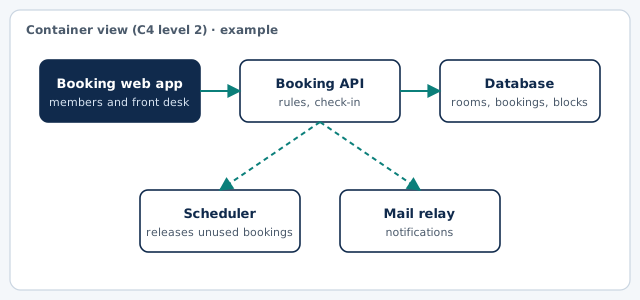
Container diagram of the example: Booking web app, Booking API, Database, Scheduler, Mail relay
Container view in the style of the C4 model. Drawn for this example.

Key screens (wireframes)

Example wireframe: Availability grid
S-1 · Availability grid (example)
Example wireframe: Check-in screen
S-2 · Check-in screen (example)

Main data entities

EntityMeaning
RoomName, capacity, equipment.
BookingRoom, member, start, end, state.
BlockRoom, reason, start, end.
RuleGrace period, maximum length, advance window.
Audit entryWho changed what and when.

Architecture decision record

ADR 1: Prevent double booking with a database constraint

context
Two members can press Book on the same slot within the same second. A check in application code alone can be bypassed by such races.
decision
We will add an exclusion constraint on room and time range in the database and treat a constraint violation as a friendly 'just taken' message.
status
Accepted (example)
consequences
Overlaps are impossible even under load. The choice ties the design to a database that supports range constraints, which is recorded as a requirement for hosting.

phase 03 · development & implementation

How it would be delivered

Increment plan

  1. Increment 1Room list, availability grid, booking and cancelling.
  2. Increment 2Check-in, automatic release, notifications.
  3. Increment 3Maintenance blocks with clash list, rule settings, audit log.

Test approach

  • Concurrency test: parallel booking attempts on one slot.
  • Time zone tests around midnight and month ends.
  • Keyboard and screen reader walkthrough of the grid.

Handover checklist

  • Repository owned by the client.
  • Rule settings guide for the floor manager.
  • Monitoring of the release scheduler.
  • Hosting requirements, including the database feature above.

What this example leaves out

There are no estimates, dates or costs here. They depend on your scope, your systems and your team, and they are discussed only after requirements analysis.